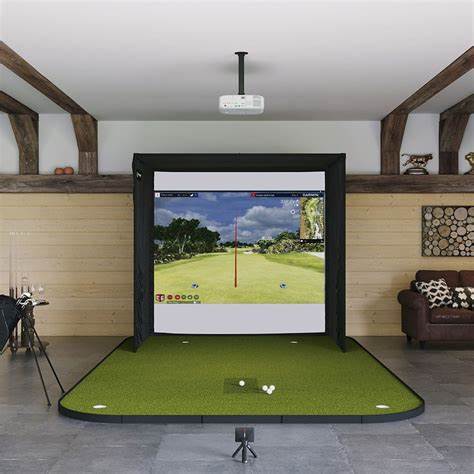
If you've been searching for the best golf simulator under $2,000, you're standing at one of the most exciting price points in the entire market. A few years ago, $2,000 would barely cover a halfway decent launch monitor with no screen, no mat, and no software. In 2026, that same budget can land you a complete, playable setup — or a seriously capable launch monitor that you can build around over time.
This guide is written specifically for beginners and budget-conscious golfers. No fluff, no gear-head jargon. Just honest answers to the questions that matter: What can you actually get for under $2,000? Which setups are worth buying? And what should you watch out for?
We've tested units in garages with 9-foot ceilings, basements with awkward pillars, and living rooms that the spouse technically said yes to. Here's what we found.
What Does "Golf Simulator" Actually Mean at This Price?
At the under-$2,000 level, you're almost always talking about a launch monitor — the brain of any simulator — and possibly some accessory items bundled in. A true full-room simulator (enclosure + screen + projector + launch monitor) typically starts at $3,000–$5,000 and climbs steeply from there.
That said, a launch monitor alone gives you:
Accurate ball data (ball speed, launch angle, carry distance, spin)
The ability to play virtual courses through apps like GSPro, E6 Connect, or the device's native app
Swing feedback you can actually use to improve
Pair it with a net, mat, and a tablet or laptop you already own, and you have a functioning simulator for a fraction of the full-room cost. For most beginners, this approach is the smartest way to start — you learn what you want before committing to a permanent installation.
→ Related: How to Set Up a Home Golf Simulator on Any Budget | Beginner's Guide to Golf Launch Monitors
The 5 Best Golf Simulators Under $2,000 in 2026
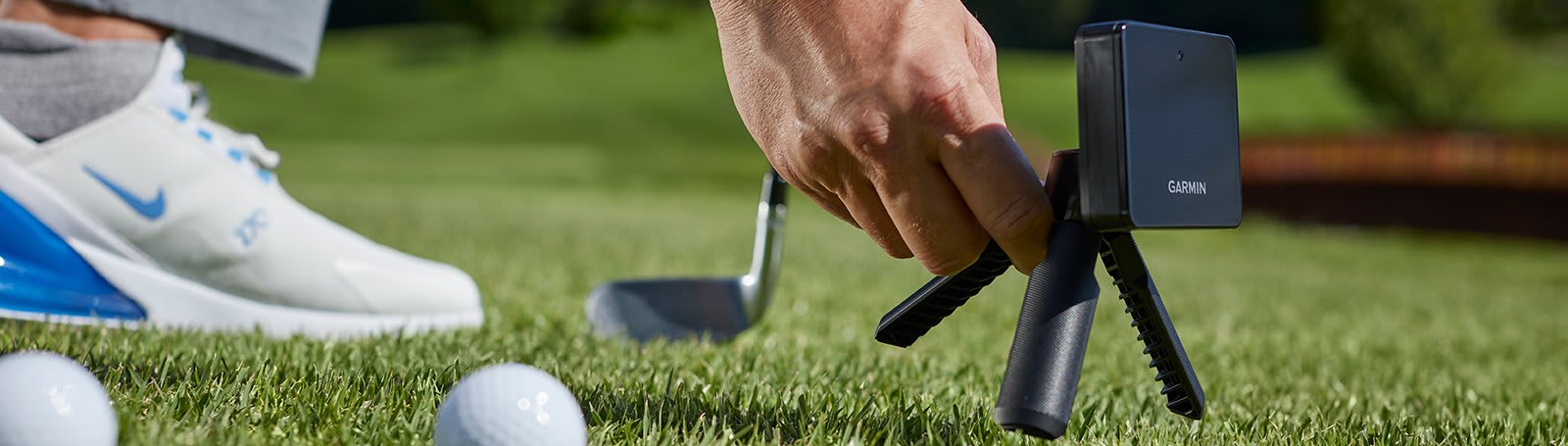
1. Garmin Approach R10 — Best Entry-Level Pick (~$599)
Who it's for: True beginners who want accurate data without overcomplicating things.
The Garmin Approach R10 is the gateway drug of home golf simulators, and for good reason. At around $599, it's the most affordable radar-based launch monitor that actually delivers reliable numbers. It sits behind the ball, pairs with your phone or tablet via Bluetooth, and connects to Garmin Golf, E6 Connect, and GSPro.
What it measures: Ball speed, launch angle, carry distance, club speed, smash factor, spin rate (estimated), and shot shape.
What it lacks: Club-path data and face angle are estimated rather than directly measured — enough for a beginner, not enough for a club-fitter. It also needs 8–10 feet of ball travel before tracking, which rules out some very tight indoor spaces.
The bottom line: If you're just getting into simulator golf and want to spend under $600 on the launch monitor, the R10 is the pick. Use the remaining budget on a quality net and mat.
Estimated total setup cost: $900–$1,200 (R10 + decent net + good mat)
2. Rapsodo MLM2 Pro — Best All-Rounder Under $700 (~$699)

Who it's for: Beginners who want both indoor and outdoor flexibility.
The Rapsodo MLM2 Pro uses a dual-camera and radar hybrid system, which makes it unusually accurate for its price. It delivers club data that rivals monitors costing twice as much, and its native app (Golf Sense) is genuinely enjoyable for casual rounds. It works outdoors on the range and indoors with a net — a rare combination at this price.
What it measures: Ball speed, club speed, launch angle, spin (via AI estimation), carry, shot shape, club face data, and video replay of your swing.
Standout feature: The built-in video overlay lets you watch your swing synced with the data. For a beginner trying to self-coach, this is incredibly useful.
Compatibility: E6 Connect, GSPro (via third-party bridge), and native app.
Estimated total setup cost: $1,100–$1,500 (MLM2 Pro + net/enclosure + mat)
3. Bushnell Launch Pro — Best Accuracy Under $2,000 (~$1,799 for full sim package)
Who it's for: The serious beginner who wants tour-level data from day one.
The Bushnell Launch Pro (based on the Foresight GC3 platform) is a camera-based launch monitor that sits beside the ball — not behind you — making it ideal for smaller spaces. It measures ball data with a level of precision typically found in $5,000+ devices.
At roughly $999 for the unit alone, it stretches the budget, but Bushnell's simulator packages (which bundle a net, mat, and basic enclosure) sometimes land at or under $2,000 during sales. This is the simulator to buy if you're committed to the long game and don't want to upgrade in 12 months.
What it measures: Ball speed, spin axis, spin rate, launch angle, carry, side carry, and club data (with a subscription upgrade).
Space advantage: Camera-based = sits 3–4 feet to the side of the ball. You can use it in a room as compact as 12' wide × 15' deep.
Software: Compatible with FSX Play (free), E6 Connect, and GSPro.
Estimated total setup cost: $1,700–$2,000 (Launch Pro + net + mat + basic enclosure)
→ Related: Bushnell Launch Pro Full Review | Camera vs Radar Launch Monitors: Which Is Right for You?
4. FlightScope Mevo+ (2023 Edition) — Best Radar Monitor for Serious Practice (~$1,999)
Who it's for: Golfers who also want to use the simulator outdoors at the driving range.
The Mevo+ sits at the very top of the $2,000 ceiling, but it earns its place. It's a radar-based monitor that tracks 16 data parameters and integrates with E6 Connect, FSX 2020, and Creative Golf 3D out of the box. The 2023 edition added improved spin accuracy and a more reliable Bluetooth connection.
The catch: Radar units like the Mevo+ need significant room depth — roughly 8–10 feet behind the golfer and at least 10–12 feet in front of the screen. Total room depth should be 20+ feet for reliable results. If you have a short garage or a basement under 18 feet deep, a camera-based system will serve you better.
The upside: You can take it to the range, use it outdoors for practice, and bring it back inside for simulator sessions. The versatility is unmatched at this price.
Estimated total setup cost: $2,000–$2,500 (likely slightly over budget when adding net/mat, but the unit alone is at the ceiling)
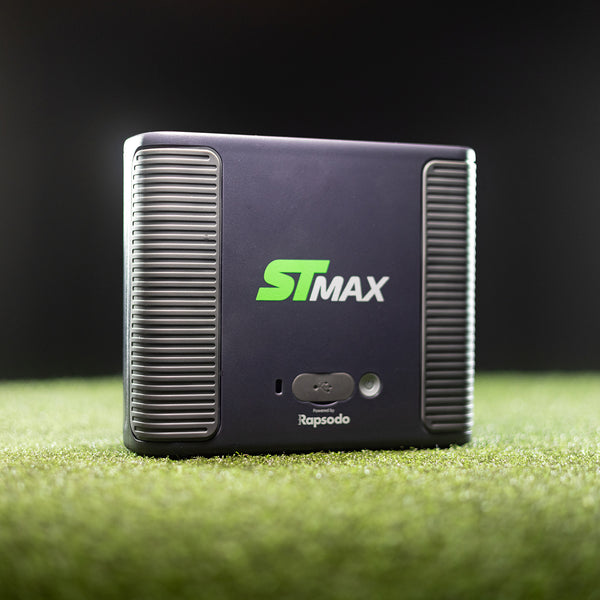
5. SkyTrak ST MAX — Best All-In-One Under $2,000 (~$999 unit / packages from ~$1,799)
Who it's for: Beginners who want the simplest, most plug-and-play experience.
SkyTrak has been one of the most trusted names in consumer golf simulation for nearly a decade, and the ST MAX is their current flagship consumer device. It's photometric (camera-based), sits beside the ball, and connects to virtually every major simulator software platform. SkyTrak's own app offers a free range mode and a $9.99/month plan to unlock basic course play.
What makes it stand out for beginners is setup simplicity. Minimal calibration, immediate feedback, and a huge community of users means any issue you run into has a YouTube video solution. SkyTrak's bundled packages — which include a net, mat, and sometimes a basic enclosure — frequently land around $1,800–$2,000.
What it measures: Ball speed, launch angle, back spin, side spin, side angle, and carry distance. Enough to play great simulator golf and genuinely improve.
Software ecosystem: WGT, E6 Connect, TGC 2019, FSX Play, Creative Golf 3D, and more.
Estimated total setup cost: $1,800–$2,000 (ST MAX package with net and mat)
How to Compare Golf Simulators as a Beginner
Don't let the spec sheets intimidate you. As a beginner, there are four things that actually matter:
1. Accuracy of ball data. You don't need club path and face angle on day one. Ball speed, launch angle, and carry distance are what make simulator golf feel real.
2. Software compatibility. Before buying any launch monitor, check which golf simulation apps it connects to. GSPro and E6 Connect are the most popular platforms. Some monitors lock you into proprietary apps that have far fewer courses.
3. Space requirements. A radar monitor sitting behind you needs 20+ feet of room depth. A camera-based unit beside the ball works in 15 feet. Measure your space before choosing.
4. Ease of setup. If you're a beginner, you don't want to spend 3 hours calibrating a device before your first swing. Camera-based systems like SkyTrak and the Bushnell Launch Pro are reliably quick to set up.
What You Need Beyond the Launch Monitor
A launch monitor on its own hits into thin air. To actually use your simulator, you'll need:
Hitting Mat (~$150–$400): Don't skip this. A thin, hard mat causes joint injuries — something that golfers discover painfully around week three of their new setup. Mid-range mats from SIGPRO or Fiberbuilt are the sweet spot for a $2,000 build. See our best golf hitting mats guide for detailed picks.
Net or Impact Screen (~$200–$600): If you're not projecting onto a screen, a quality practice net is all you need. The Net Return Pro is the gold standard, but Spornia and Rukket offer solid budget options. If you want to see the virtual course displayed, you'll need an impact screen — typically $300–$500 for a decent one.
Device to Run Software: Most apps run on iPad, Android tablet, Windows PC, or Mac. Check the system requirements before purchasing. SkyTrak's basic app works on iPad. GSPro requires a Windows PC.
Projector (Optional at this budget): A short-throw projector that throws 1080p onto your impact screen costs $600–$1,000 for a reliable model. At the under-$2,000 budget, this usually pushes you over the limit unless you choose a lower-cost launch monitor.
→ See also: Best Golf Practice Nets for Home Use | Shop Complete Simulator Packages Under $2,000
Space Requirements: The Make-or-Break Factor
This is the most commonly overlooked issue for first-time buyers — and the most expensive mistake to correct.
Here are the practical minimums:
Setup Type | Min. Ceiling Height | Min. Room Depth | Min. Room Width |
|---|---|---|---|
Basic net + any launch monitor | 9 ft | 12 ft | 10 ft |
Radar monitor (behind ball) | 9.5 ft | 20–25 ft | 12 ft |
Camera monitor (beside ball) | 9 ft | 14–16 ft | 10 ft |
Full screen + projector | 10 ft | 16–20 ft | 12 ft |
The takeaway: if your garage or basement is under 18 feet deep, lean toward camera-based monitors (SkyTrak ST MAX, Bushnell Launch Pro). If you have a long, deep space, a radar unit like the Mevo+ or Garmin R10 may work perfectly.
According to InHome Golf, a room size of 10 ft tall × 15 ft wide × 20 ft deep suits a functional simulator, with 10 ft ceilings being the more comfortable standard.
Best Golf Simulator Software for Beginners
The software is where simulator golf actually happens. Your four main choices:
E6 Connect (~$300–$600/year): Works with nearly every launch monitor on this list. Beautiful graphics, dozens of courses, and solid practice modes. The most beginner-friendly of the major platforms. Good choice if you want broad device compatibility.
GSPro (~$250/year): The favorite of the simulator community. Thousands of community-built courses, online rounds, and leaderboards. Requires a Windows PC, but the gameplay realism is hard to beat.
Awesome Golf ($15/month or ~$350 lifetime): The easiest to set up. Works on iPad, Mac, and PC. Best for casual family use where simplicity matters more than course variety.
Native Apps (Garmin Golf, SkyTrak app, Rapsodo Golf Sense): Every device ships with its own app. These are fine for hitting into a net and reviewing data, but most players want more courses over time. Think of the native app as your starting point, not your destination.
Should You Buy a Bundle or Build Your Own?
Buy a bundle if: You want everything to arrive at once, you're not confident about component compatibility, and you don't mind a slightly higher price for peace of mind. SkyTrak's studio packages are the best example of a well-curated beginner bundle.
Build your own if: You already own some components (a Windows PC, a decent iPad, a used net), or you want to mix and match a specific launch monitor with a higher-quality mat than what comes in most bundles.
For most beginners, the bundle route wins on simplicity. Just ensure the bundle includes a mat you'd actually want (foam-backed, shock-absorbing, at least 1.5 inches thick), not a thin rubber slab that will punish your wrists.
The authoritative golf resource Practical Golf recommends starting with a moderately-priced launch monitor and building the setup around it — a strategy that applies perfectly to the sub-$2,000 category.
Our Recommendation for Most Beginners
If you want the most complete experience under $2,000 right now, the SkyTrak ST MAX package (bundled with net and mat, typically $1,800–$2,000) is the easiest, most capable entry point. It's accurate enough to genuinely improve your game, connects to every major software platform, and has been trusted by the home golf community for years.
If budget flexibility is the priority and you want to build gradually, start with the Garmin Approach R10 at ~$599 and invest the remaining $1,400 into quality supporting gear: a SIGPRO or Fiberbuilt mat, a Net Return practice net, and an iPad or Windows laptop for software.
Either path leads to the same destination: swinging a club year-round, in your own space, with real data telling you exactly what's happening. That's the whole point.
→ Explore all simulator options: Shop Golf Simulator Packages at HomeGolfSetup
Sources and further reading: Practical Golf — Home Golf Simulator Guide | MyGarageGolf — DIY Launch Monitor Setup Guide
Frequently asked questions
Independent golf equipment reviewer. Tests every product in real home conditions before publishing a verdict. No paid placements.
Related guides
Affiliate disclosure: We earn a small commission if you buy through our links — this never influences our scores or recommendations. Learn more


